
Ecommerce analytics with first-party tracking and multi-touch attribution

Accelerate profitable growth with Kiito

Make better marketing and business decisions with ecommerce analytics built around profitability. Know what to change today to improve your bottom line.

Get started for free

View pricing

Increase your profit within 30 days or get your money back.

From scattered data to smart decisions

Scaling ecommerce profitably has been a pain. WooCommerce and Shopify analytics show orders and revenue, but don’t combine that with order-related costs. Ad platforms exaggerate sales. Your accountant might be the only one tracking the business costs. Try figuring out the actual daily profit of a single product or ad from all that.

Then you change a product’s price or campaign budget, and there’s no record of that. A month or two later, you’ve forgotten about it and wonder why profit plummeted around that time.

Kiito brings all that scattered data together, adds first-party tracking and multi-touch attribution, and turns it into eye-opening ecommerce analytics.

Kiito was made for store owners and performance marketers like ourselves, to provide accurate and useful insights that help maximize growth without sacrificing profitability.

A single source of truth for your whole team's daily business decisions
Free 14-day trial

Key features

Kiito has sections for products, ads, traffic sources and customer lifetime value. Under each section, you will find the following features.
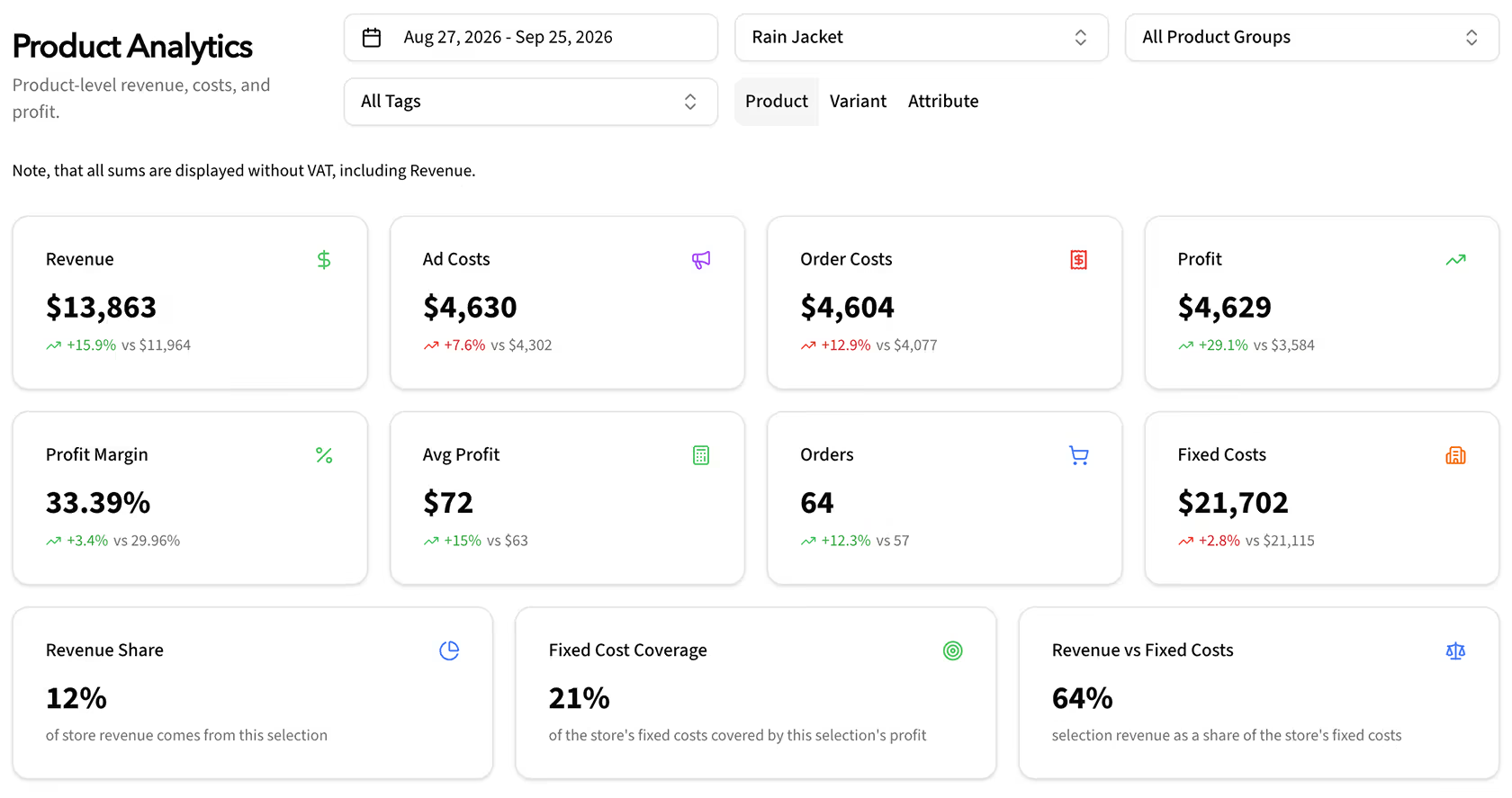
Kiito product analytics filtered to Rain Jacket, showing revenue, costs, profit, period comparisons and fixed cost coverage.

Core KPIs in each section. Overall, how did your business do during the period?

  1. Filters per section See financials for specific products/categories/campaigns and so on.
  2. Real profit Profit and profit margin after all costs.
  3. Fixed cost coverage How much of the monthly expenses are covered by the orders' profit.
  4. Change percentages Did the business grow profitably compared to the previous period?

For products, categories, tags, campaigns, ad sets, ads, keywords, traffic channels, UTMs and more!
Core KPIs
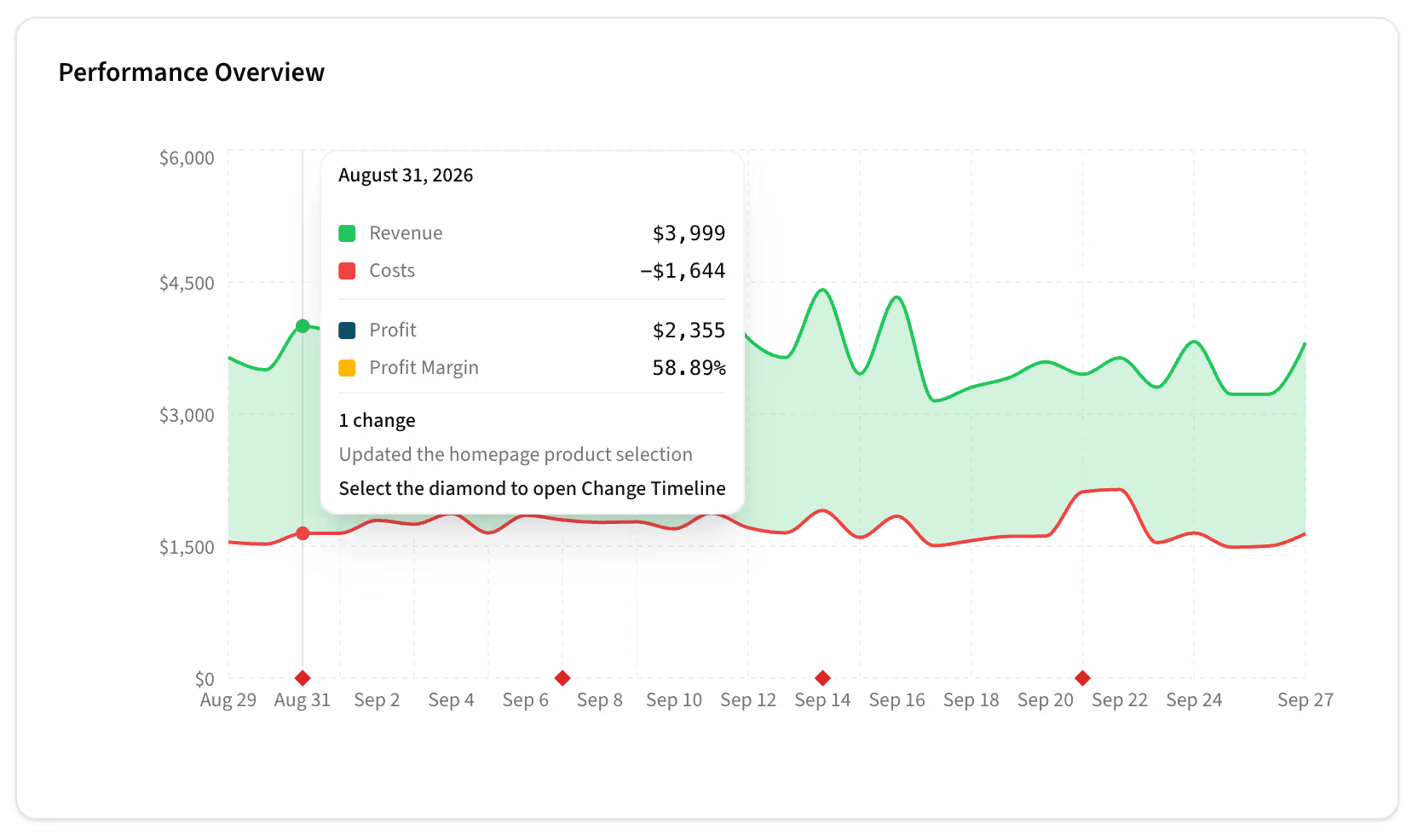
Kiito daily revenue and costs graph with change markers and a tooltip showing financial metrics and a homepage product selection update.

Easy-to-read daily graphs, with financials and change details.

  1. Easy to interpret Green line as revenue, red line as costs – the area between is profit/loss.
  2. Hover or tap Hover over or tap the graph to see the details.
  3. Changes See budget and pricing changes on the graph – did the changes produce a positive effect?

For products, categories, tags, campaigns, ad sets, ads, keywords, traffic channels, UTMs and more!
Daily graph
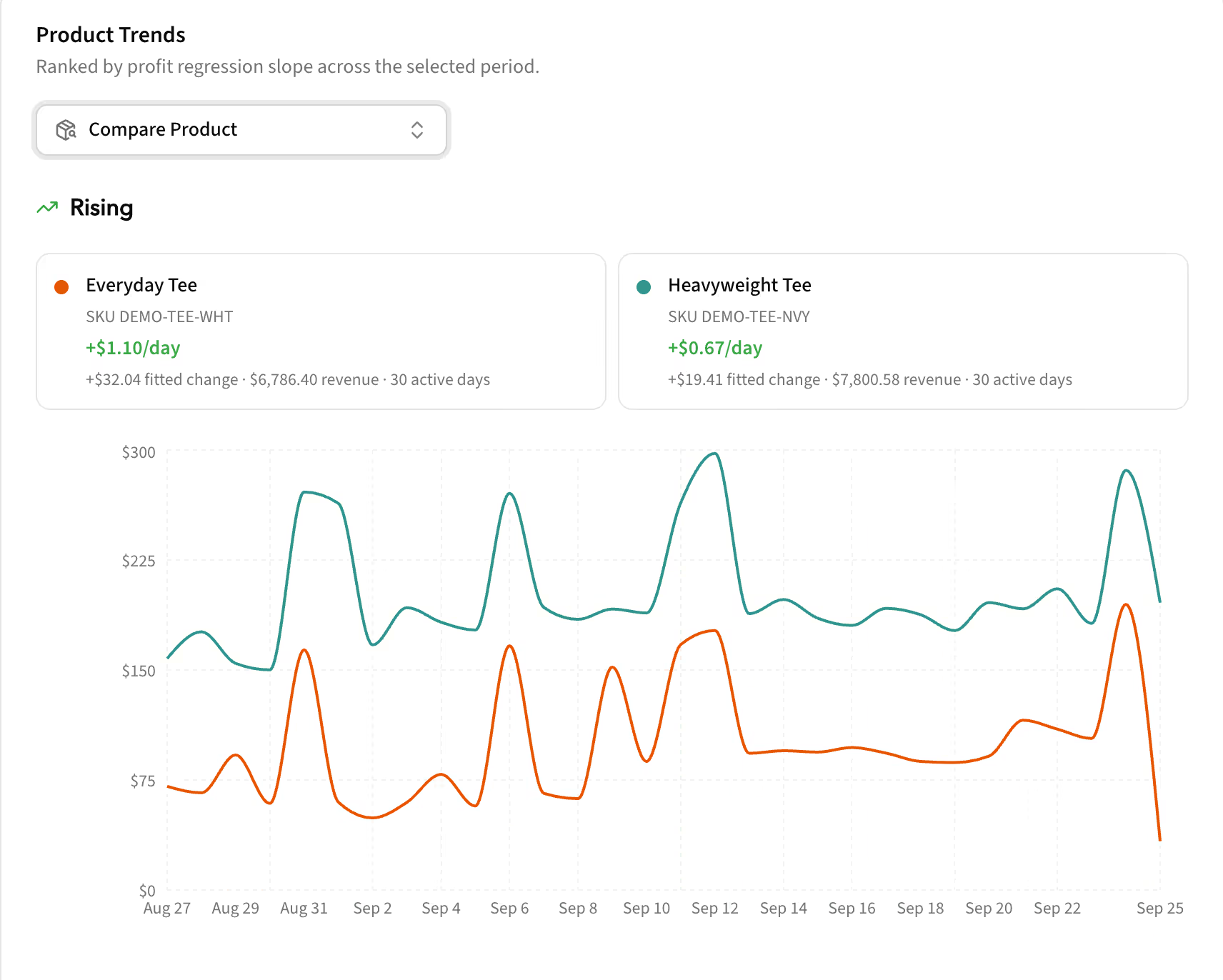
Kiito Product Trends comparing rising profit trends for Everyday Tee and Heavyweight Tee, with daily profit lines and trend summaries.

Kiito shows which items start to trend up or down. Notice fatigue early and react to it.

  1. Compare items Check the trend of a specific item and compare it to the others.
  2. Overall changes Overall change/trend of the item during the period.
  3. Daily changes See what the trend looks like for each day.

For products, categories, tags, campaigns, ad sets, ads, keywords, traffic channels, UTMs and more!
Trends
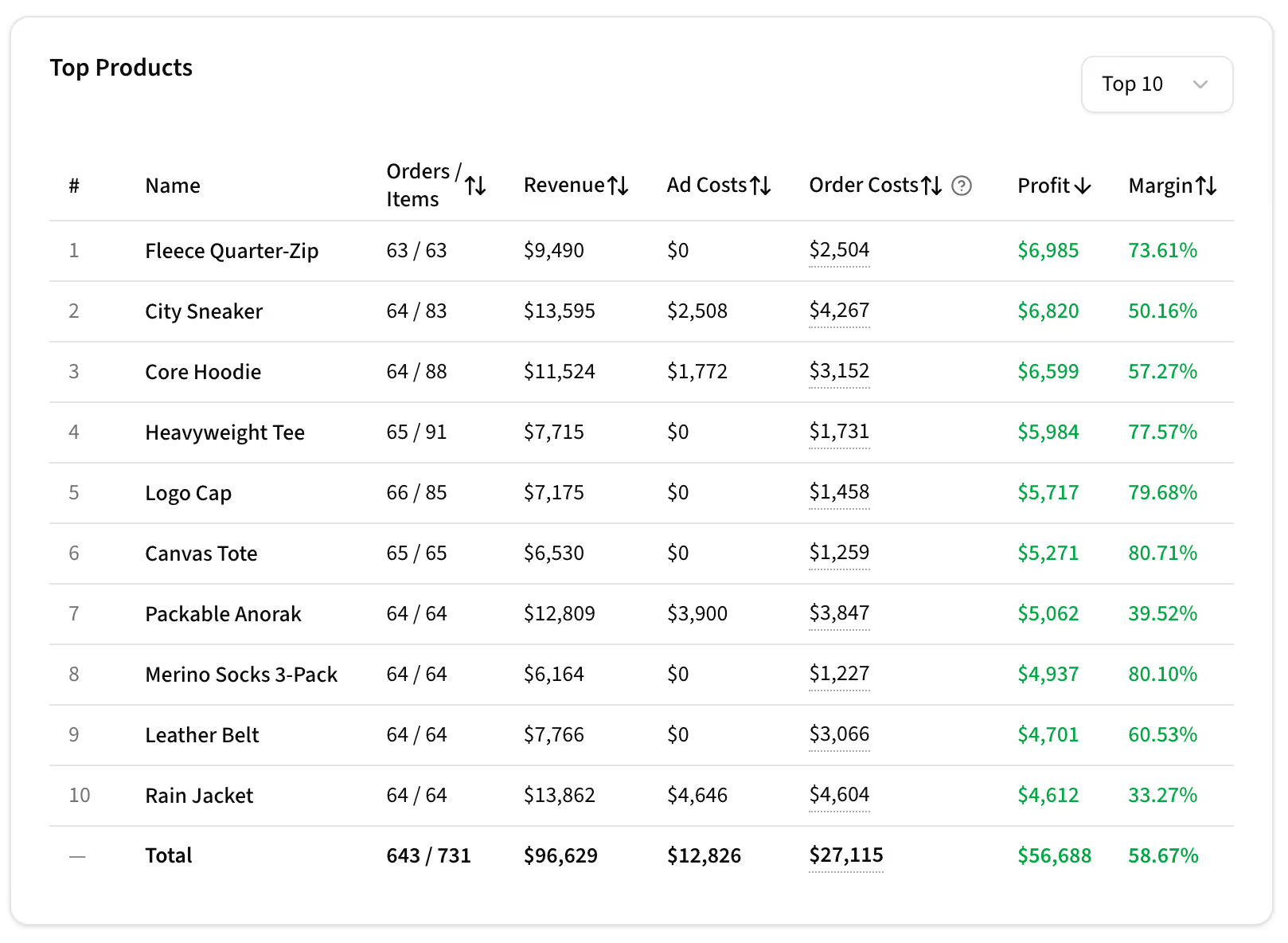
Kiito Top Products table ranked by profit, with orders, units sold, revenue, ad costs, order costs and profit margins.

Best and worst performers. Product or campaign selling well might not actually be the best when all costs are added up.

  1. Sorting Sort by any column, including profit, units sold or ad costs.
  2. From top 10 to 100 Show just the best/worst or all of them.

For products, categories, tags, campaigns, ad sets, ads, keywords, traffic channels, UTMs and more!
The Best & Worst
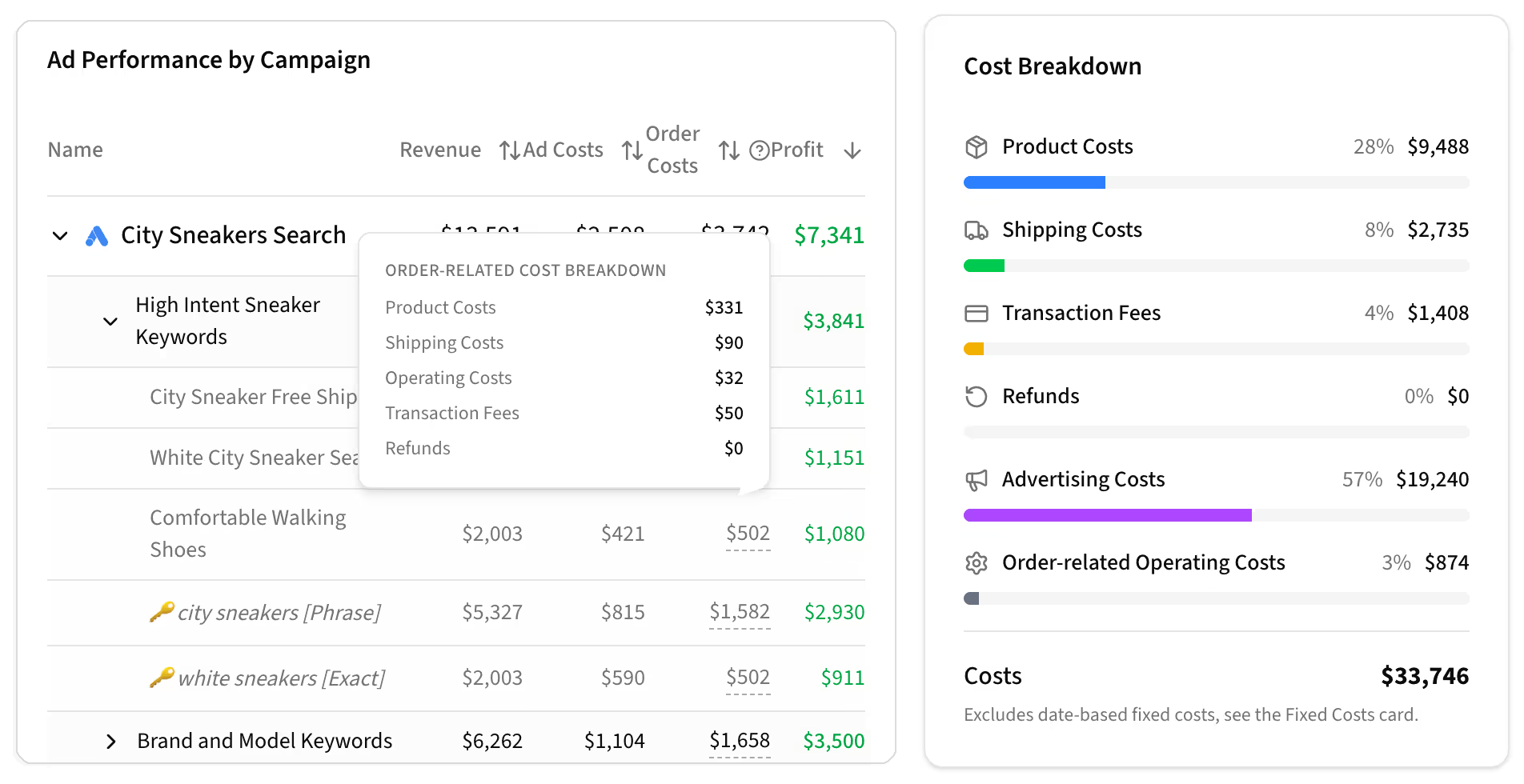
Kiito campaign table with an order cost tooltip, alongside an overall breakdown of product, shipping, transaction, refund, advertising and operating costs.

Cost breakdowns per individual item and overall.

  1. Details on hover Hover over or tap an item's costs and get a detailed cost breakdown.
  2. Overall costs See the overall cost breakdown next to the daily graph in each section.

For products, categories, tags, campaigns, ad sets, ads, keywords, traffic channels, UTMs and more!
Cost breakdowns
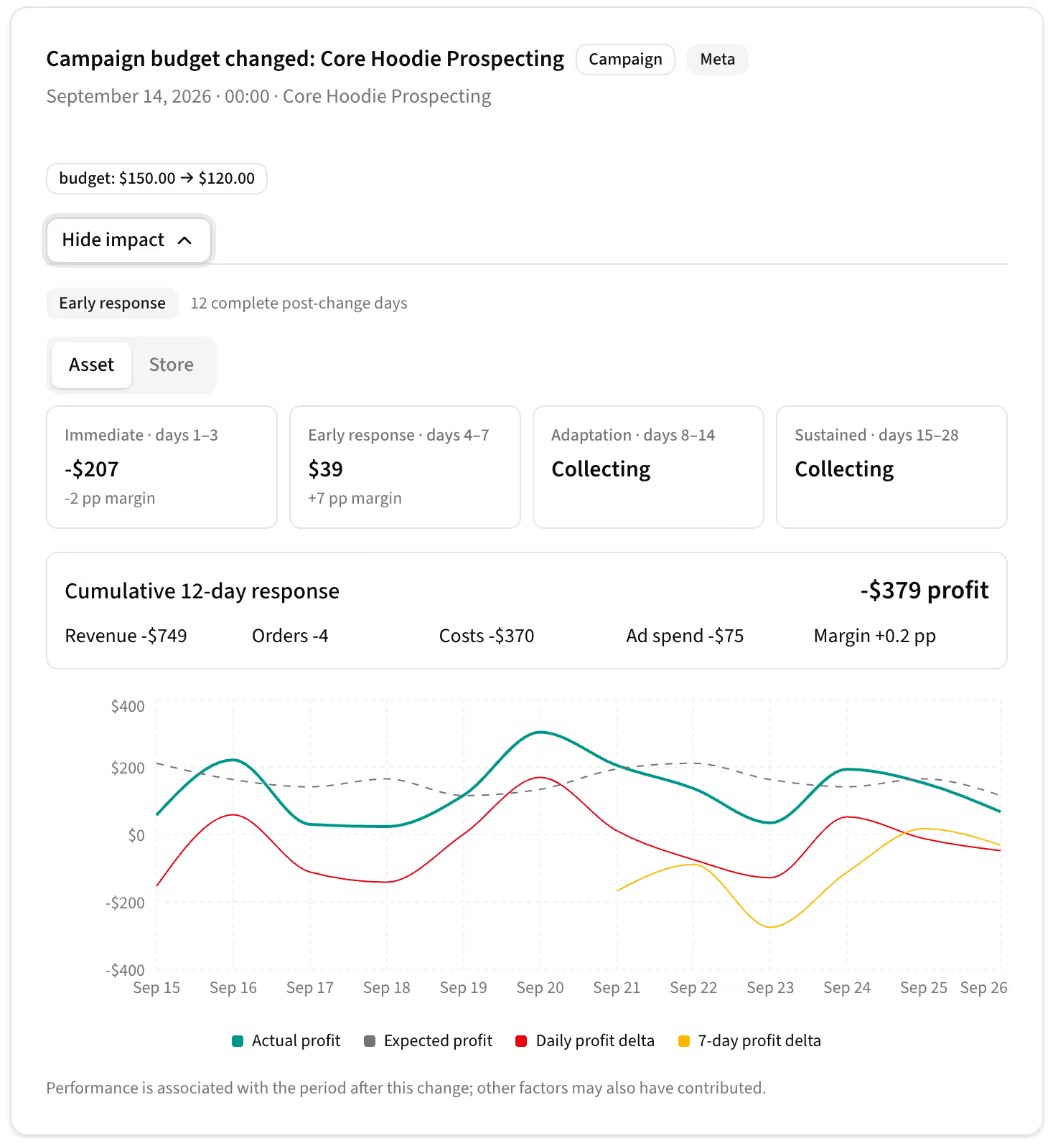
Kiito Change Timeline showing a campaign budget reduction, performance summaries by phase and actual versus expected profit.

Price, budget and status changes are logged automatically. See each change on the timeline and how it affected the financials.

  1. Item vs store How did it affect the specific asset? How about the store overall?
  2. Impact in phases See customer behavior immediately after the change, in the early days, during the adaptation phase and afterwards.
  3. Actual vs expected Actual profit against what was expected without the change.

For products, categories, tags, campaigns, ad sets, ads and keywords.
Timeline
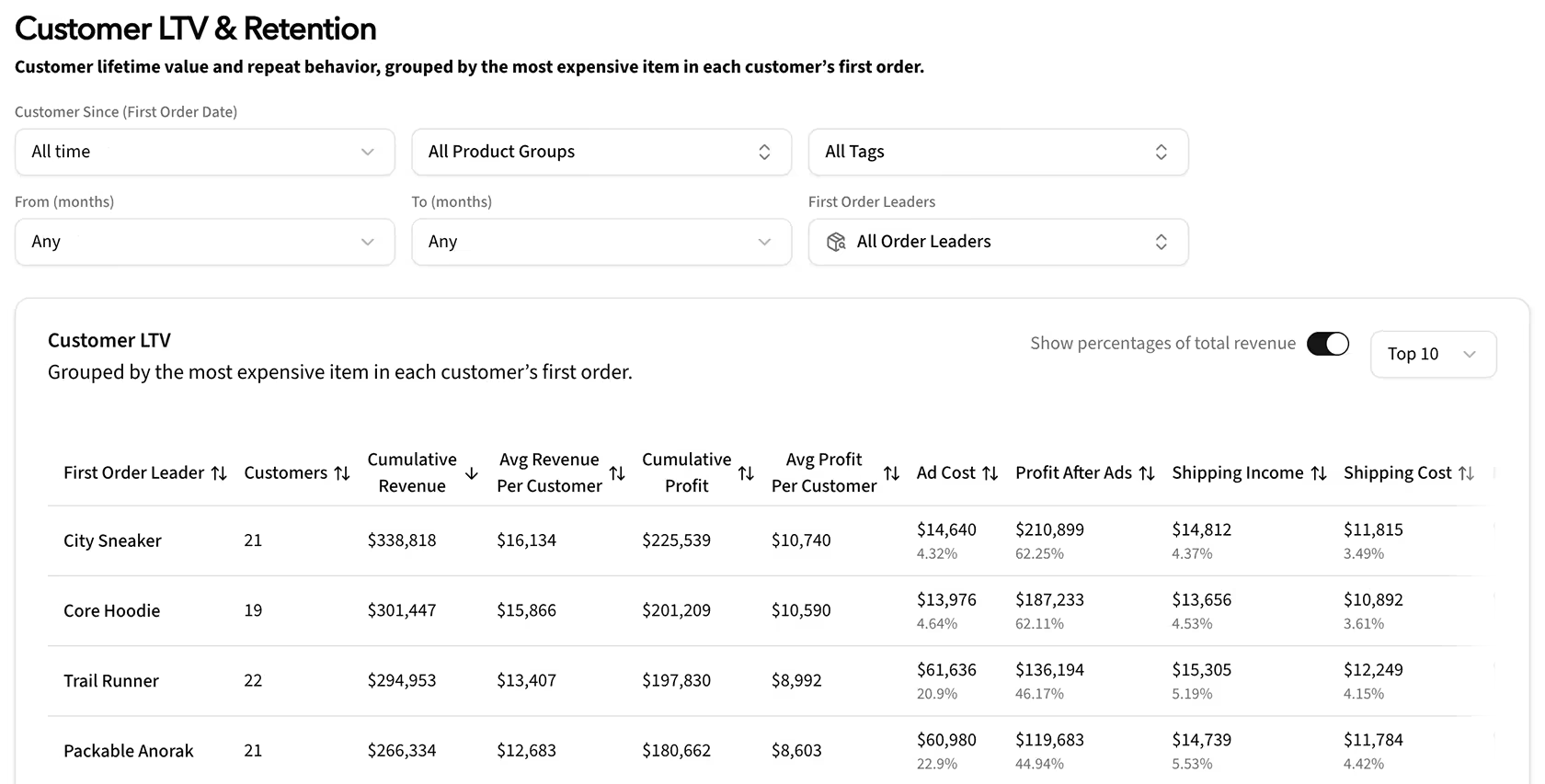
Kiito customer lifetime value table grouped by the most expensive item in each customer’s first order, with lifetime filters, revenue, profit and costs.

See which products, categories and tags bring in the most profitable customers, measured by lifetime value.

  1. Filter by lifetime Which first-order products have produced the most profitable customers 3-6 months after the first order?
  2. Filter by asset How are summer-related products doing in terms of LTV?
  3. Real value See the real value for each item – how valuable the customer is when all costs are accounted for.

For products, categories and tags.

Customer LTV
Try yourself with the live demo

Know which ads to scale

You notice excellent numbers on Facebook's dashboard. You start smiling — you have finally cracked it! Then you check your store’s actual orders and half the conversions aren't there. That smile disappeared pretty quickly.

Facebook doesn't know that you are also running TikTok, X and Google Ads. It is common for multiple platforms to report a conversion for the same purchase. Your actual CPA and ROAS can therefore be much worse than what the platforms report. Add today's tracking limitations on top of that, and the discrepancy can grow even further.

And even when the data is accurate, ROAS still doesn't tell you whether an ad is actually profitable. Once you account for product, shipping, transaction and other costs, an ad can still make a loss despite a strong ROAS.

Kiito bases its analytics on actual orders and first-party visit data from your store, rather than conversions reported by individual ad platforms. It connects this data with your ad platforms and allocates each order's revenue and costs across the customer's visits, so you can see the actual profit for each ad.

Scale the ads that actually make money – not the ones that only look profitable.

Increase your ad spend ROI, or get your money back.
Get started for free

Priced for your store

Your monthly price is based only on the ecommerce store revenue we track. Other sales channels and total business revenue don’t affect your price.

Tracked monthly revenue (up to)
Kiito Starter
$49/mo
For stores doing up to $20K/mo in revenue
Start scaling profitably today
Start your free trial
30-day satisfaction guarantee

Increase your profit within 30 days, or we’ll refund your payment.

Up and running before your coffee goes cold

No tracking pixels and no developer work. Connect your store and advertising accounts in a few clicks, and Kiito begins importing your data.

Using Kiito does not require a deep understanding of performance marketing. Anyone can start using it right away. Setup takes about ten minutes.

We support WooCommerce and Shopify and most ad networks. If some integration is missing or you need a custom implementation, tell us, and help shape what we build next.

support@kiito.io

Sign up for free

From the Founder

In 2022 I started my own DTC ecommerce brand, Zaint. I was happy with the numbers in the advertising platforms. We easily had 3-5x ROAS most of the time. It seemed like we were making good money, yet I realized that our bank balance was actually shrinking.

So I decided to find out why. I wasn’t satisfied with the ecommerce analytics tools available. Many didn’t focus on profit or lacked detailed advertising attribution. Others locked important features behind plans costing hundreds of dollars per month, even for a small store.

I’ve been a software engineer for more than 20 years. As a teen I made visitor counters that served thousands of requests per second from two servers in my closet. Then worked as a consultant for advertising agencies and large online businesses through my own company. So the solution was obvious.

I started developing Kiito with one goal: helping ecommerce stores improve their profitability. It launched in the summer of 2026 – this time running on AWS servers in France instead of in my closet.

With Kiito, we were able to see which ads and keywords were actually profitable and which products had the best margins after accounting for all costs. Most importantly, I saw that we needed more paid traffic to cover our fixed monthly costs. We increased Zaint’s profit margin from around 0% to 30%. It’s amazing how helpful eye-opening statistics can be.

If you have any questions, feature suggestions or aren’t sure whether Kiito is suitable for you or your client, hit me up at niko@kiito.io and I’ll personally get back to you as soon as I can.


Niko Viitala

Niko Viitala, CEO

Kiito / Online Revenue Oy

LinkedIn

Frequently Asked Questions

What exactly does Kiito do?

Kiito helps ecommerce businesses improve their profit with actionable insights. Kiito brings store, visitor, advertising, and business cost data together. It connects marketing activity to actual orders and shows which products, campaigns, ads, and channels generate profit – not just revenue.
You can see Kiito in action here.

Kiito is made for Shopify and WooCommerce store owners, marketing teams, and agencies that want to understand their stores’ profitability and improve performance. You do not need to be a data analyst or an expert in performance marketing to use it.

Kiito currently supports Shopify and WooCommerce. Connect your store and advertising accounts to bring orders, marketing performance, and costs into the same analytics platform. If an integration you need is missing, contact us.

Kiito currently connects directly with Google Ads, Meta, TikTok, X, and Reddit. Other traffic sources can still appear in attribution when they are identified through UTMs, advertising click identifiers, or referring websites. If an integration you need is missing, contact us.

Definitely.
– This is not a vibe-coded service.
– We have over 20 years of experience with web servers and security.
– Our firewall and server software are custom-configured for maximum security and regularly updated.
– Only authorized Kiito's employees have read access to your ecommerce data.
– Kiito doesn't have write access to your site.
– Kiito can only read ecommerce-related data such as orders, products, shipping methods and categories.

The answer to this got quite long, so we made a blog post for it.

You can use the complete Kiito feature set free for 14 days. You may cancel before the 14-day trial ends and pay nothing. If you choose to continue using Kiito, the subscription is billed monthly.

Cancellation is easy to do yourself. There is no need to contact customer support. Just click Cancel, and Kiito will not charge you again.

No. You can connect your store and advertising platforms directly to Kiito with a single click.
If your store uses WooCommerce, we recommend our Multi-Touch Attribution and MTA Pro plugins for more accurate attribution. They can be installed with a single click.

No. Your data will not be shared to 3rd parties.

It will not. All the data is imported to and processed on Kiito’s own servers.

If your ads include unique UTM parameters, you are all set. No Kiito-specific links or redirects are needed.

Kiito will automatically warn you if it notices that an ad does not contain unique UTM parameters and give instructions on how the ad link should be modified.

Kiito uses the best attribution available when the UTM parameters are missing or non-unique:
- If an ad has no UTM parameters, Kiito attributes the order to the identified source, such as Facebook, even if it cannot identify the exact ad or keyword.
- If several ads use the same UTM parameters, Kiito distributes the attributed revenue across the matching ads.

However, unique UTM parameters provide the most precise ad- and keyword-level reporting.

Not always, and that is actually a feature, not a bug. Unlike ad platforms, Kiito has visibility into your store’s actual orders, customer journeys, and all the ad platforms you use. This enables Kiito to provide an accurate cross-platform view of revenue and profit.

No. Kiito combines all the visits of the purchaser and attributes revenue across the relevant visit sources.

Kiito imports orders and ad data from the past three years. Note, however, that connecting each sale to specific ads depends on how long the ads’ tracking parameters have remained stable.

Kiito automatically refreshes your store and advertising data every couple of hours. Exact timing may vary slightly between platforms.

Yes. You can add multiple stores to the same Kiito account and switch between them without using separate logins. Each store keeps its own integrations, costs, analytics, and subscription.

Yes. If you manage several client stores, contact us to discuss agency pricing, volume discounts, and referral commissions. We’ll find an arrangement that fits the number of stores you manage.

Please send us an email at support@kiito.io