
Most WooCommerce purchases do not begin and end in a single visit. A shopper might first discover a product through a Meta ad, return a few days later through Google, open an email the following week and eventually place the order during a direct visit.
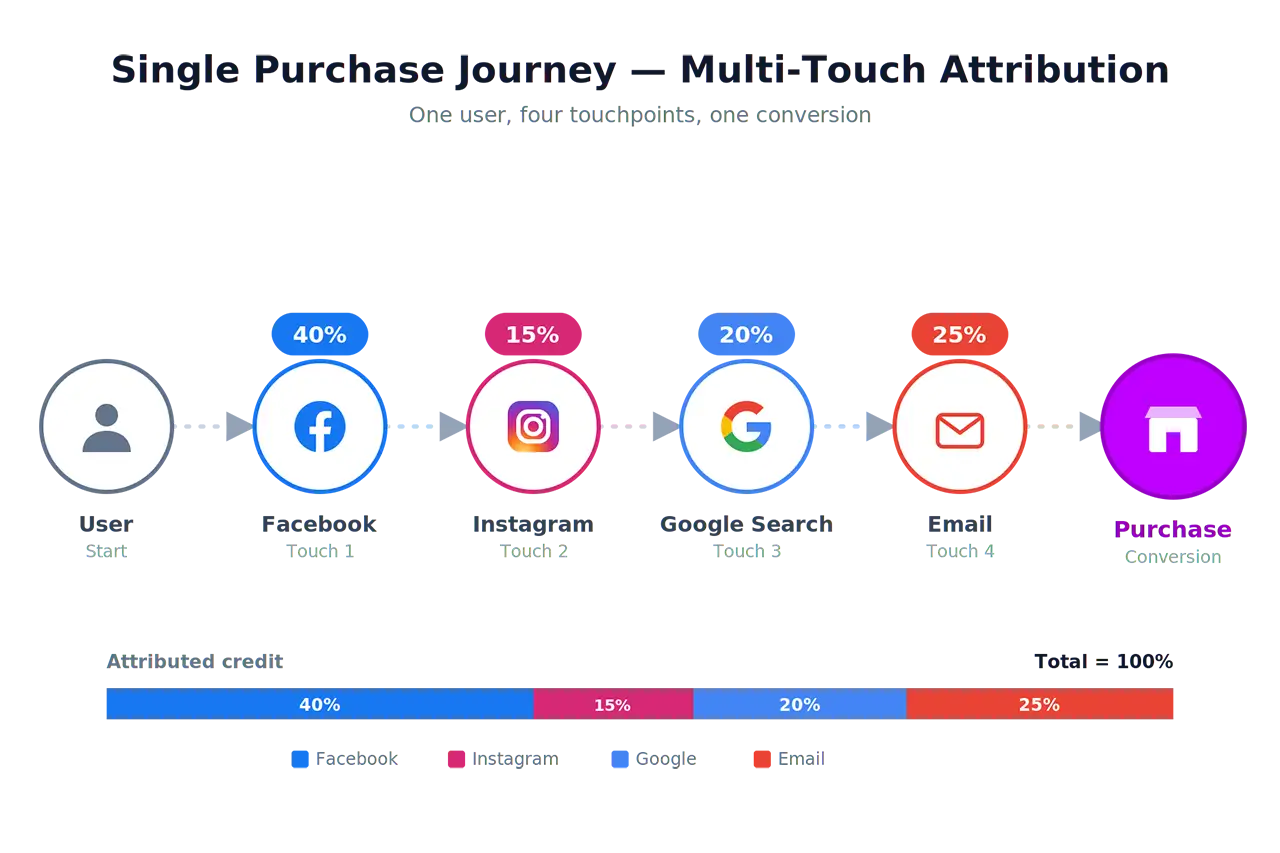
WooCommerce still has to assign that order to a source. Its built-in attribution uses a last-click model, so the final traffic source receives the credit. That gives the store a clean answer, but often leaves out the marketing that introduced the customer or kept the product in consideration.
We created Multi-Touch Attribution for WooCommerce to preserve those earlier visits. The plugin records the traffic source behind each customer visit and connects the journey with the WooCommerce order. It is free, open source and useful on its own. Store owners who connect it to Kiito can go further by combining the journey with revenue, advertising spend and profit.
In brief
- Multi-Touch Attribution for WooCommerce is free and works on its own. A Kiito account is not required to track full customer journeys.
- The plugin records the sources involved before an order. It supports UTM parameters, advertising click identifiers and referring websites.
- Connect Kiito when you want to know what those visits were worth. Kiito combines the recorded journey with revenue, advertising spend, product costs, refunds, shipping, payment fees and other costs.
- Having the whole recorded path allows revenue credit to be shared among the sources that contributed to the purchase. The final interaction no longer has to receive the entire order simply because it happened last.
- Privacy settings remain with the store, including WP Consent API support, hashed diagnostics by default and control over how long visit data is retained.
Why last-touch attribution can lead to the wrong answer
Last-touch attribution is easy to understand and relatively easy to build. WooCommerce only needs the qualifying source from the session in which the order is placed. Its attribution cookies expire with that session, and WooCommerce confirms that the built-in feature does not track visitors across sessions. Earlier visits are therefore unavailable when the order is attributed.
Take a common customer journey:
Paid social ad → Direct return → Branded Google search → Email → Order
A last-touch report gives the email all the credit. It doesn’t show that the paid social campaign introduced the product and started the journey, or the Google search.
This matters when budgets are reviewed. If an advertisement repeatedly creates demand but customers later return through search, email or direct traffic, last-touch reporting will make the ad look weaker than it is. A store can end up cutting the campaign that brings in new customers while increasing spending on channels that mainly help existing prospects find their way back.
Make better decisions with multi-touch attribution (MTA)
Multi-touch attribution keeps the visits that happened before the order and considers the part each source played. It does not force the store to choose one winner from a journey that involved several channels.
In the example above, paid social brought the customer to the product, branded search helped them return and email provided another route back before purchase. A multi-touch model can recognise all three contributions instead of handing the complete order to the email.
For the store owner, this gives a more useful picture of how marketing works in practice. It reveals which channels introduce new customers, which ones bring interested shoppers back and which combinations commonly lead to sales. Budget decisions are then based on the whole route to purchase rather than whichever source happened to appear at the end.
A free WooCommerce plugin that records the journey
Multi-Touch Attribution for WooCommerce records the acquisition source behind each tracked visit and connects those visits with the resulting WooCommerce order.
The plugin identifies traffic using:
- UTM parameters, including source, medium, campaign, content and term
- Advertising click identifiers used by Google Ads, Meta, TikTok, Microsoft Ads, LinkedIn, Reddit and other platforms
- The referring website when campaign parameters are missing
Each captured order receives its own attribution panel in WooCommerce. It shows the recorded path with source and medium, campaign details, timestamps and visitor-matching information. This is particularly useful when WooCommerce reports an order as Direct / Direct or attributes it to a payment gateway. The earlier visits may reveal where the customer actually came from.
The plugin also includes reports for top traffic sources, common source-and-medium combinations, touchpoints per order and differences between its results and WooCommerce’s attribution. Order attribution can be exported to CSV when the store needs the data elsewhere.
Visit tracking, order capture, journey inspection, reports, settings and exports work without a Kiito account. Store owners can also choose the attribution window, visit timeout and data-retention period. The plugin supports WooCommerce High-Performance Order Storage and prepares its order statistics when attribution is captured, keeping the reporting work away from the customer’s storefront visit.
Keeping the full journey intact
The tracking script and collection endpoint are served from your own domain. Visits are written directly into the store’s database during tracking, without loading a third-party analytics script or sending the visitor through an outside tracking endpoint. This makes the tracker less exposed to rules that commonly block known third-party analytics services.
The free plugin keeps its visitor identifier in a server-set cookie, a JavaScript cookie and local storage. If one storage method is unavailable while another remains, the journey can continue under the same identity. The optional MTA Pro add-on adds advanced visitor matching for cases where cookies are unavailable, but it is not required for the free plugin’s tracking, reporting or exports.
Connecting Kiito shows what those sources were worth
The plugin records which sources preceded an order. It does not have the cost data needed to calculate what those sources earned for the business.
Kiito adds that commercial layer. It combines the recorded attribution path with WooCommerce revenue, advertising spend, product costs, refunds, shipping, payment fees and other operating costs. The store can then examine performance by traffic source, advertising platform, campaign, advertisement and keyword.
Kiito distributes revenue credit among the relevant non-direct touchpoints in the recorded journey. A direct return does not take revenue away from the marketing that brought the customer to the store.
The model also looks at what happened near the end of the journey. Suppose a customer clicks a paid social ad, browses the store and then opens a discount email an hour later to complete the purchase. The email is the final recorded visit, but its timing suggests that it helped the customer return after the ad had already created the interest. Kiito can give more of the order to the earlier ad while still recognising the email’s contribution.
The same issue appears with branded searches. Someone may see an advertisement, remember the store name and search for it later. Giving the branded search the entire order would make the route back look more valuable than the marketing that caused the customer to search for the brand.
Kiito carries that attributed revenue through to profit. Store owners can see which campaigns create profitable demand, which channels mainly assist other marketing and which apparent successes disappear once product costs, advertising, shipping, refunds and fees are included.
Privacy and consent remain under the store’s control
The plugin uses hashed values for sensitive diagnostics by default and supports the WP Consent API. When a store requires opt-in consent, tracking waits until the selected category has been allowed. Store owners also control how long visit data is retained and remain responsible for describing the tracking in their privacy policy.
The report includes the visits the store was able and allowed to record. Even with that natural limitation, it provides far more context than keeping only the final source.
See what is really driving your sales
Install Multi-Touch Attribution for WooCommerce and let your next orders begin building a clearer picture of how customers reach your store. The plugin is free, works independently and gives you useful attribution data directly inside WooCommerce.
When you are ready to connect those journeys with advertising costs, margins and profit, start using Kiito. Together, the plugin and Kiito show which traffic sources take part in the sale and which ones deserve more of your marketing budget.
— Niko Viitala
← Back to articles