Free Plugin for WooCommerce

Improved Order Attribution for WooCommerce

See the source of every visit a customer makes, so you know exactly which ads and other traffic sources contribute at every stage of the customer lifecycle.

Built for WooCommerce

Track every visit across the customer journey

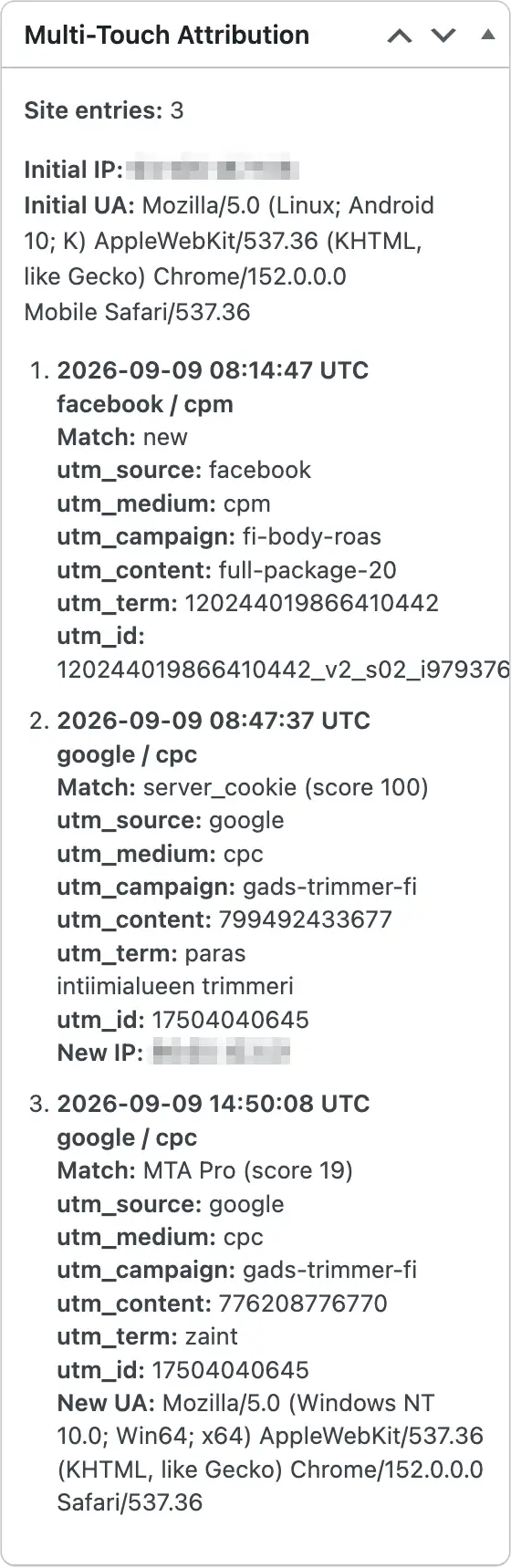
Becoming a customer takes time. Someone might first click a Meta ad, return through Google a few days later, open a promotional email, discard their cart, and finally complete the order through an abandoned-cart email sequence.

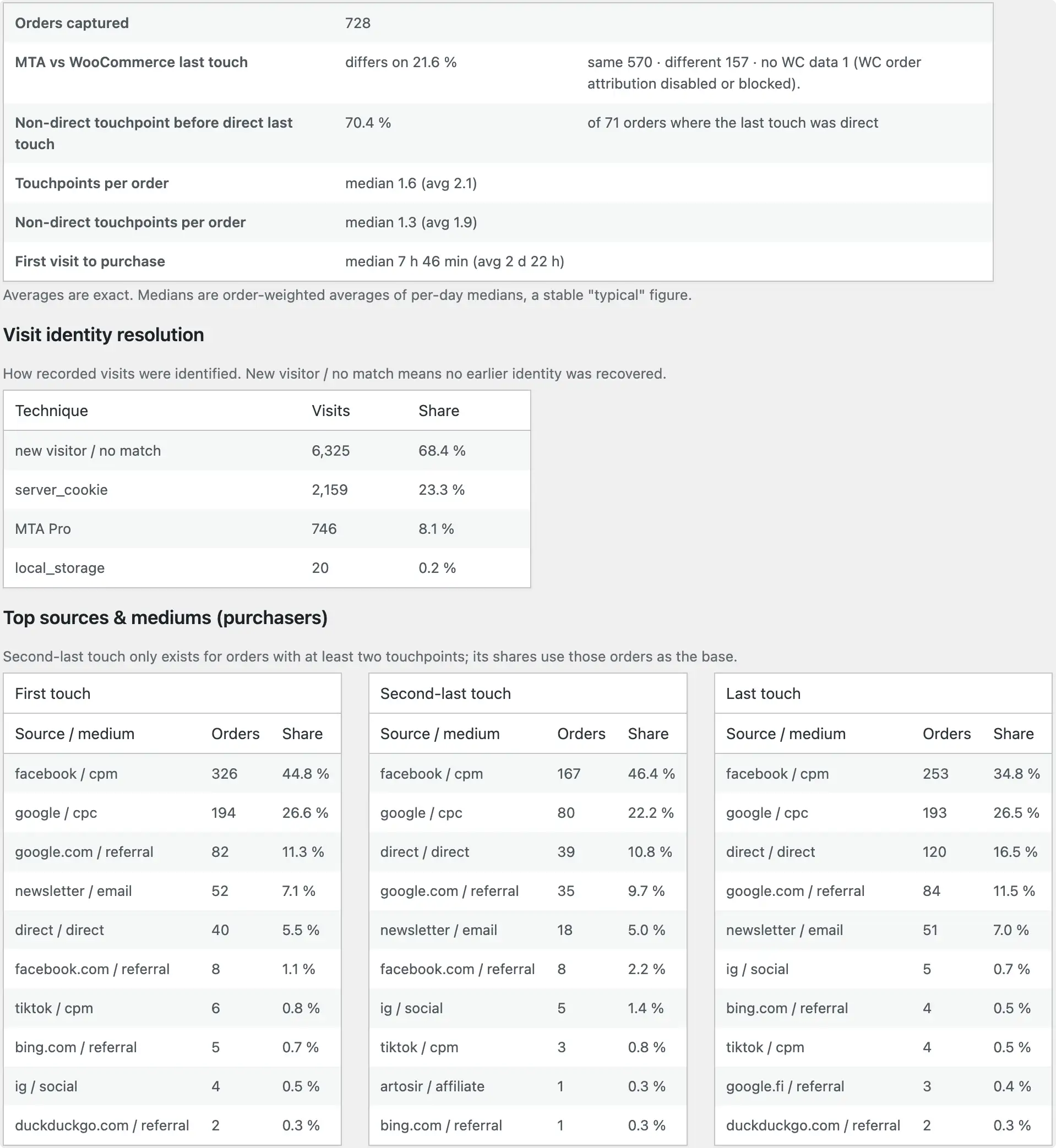
WooCommerce’s Order Attribution shows you only the source of the last visit. If you only look at that, all those important steps are missed.

Our free, open-source Multi-Touch Attribution for WooCommerce plugin records the source of each visit and connects those visits to the eventual WooCommerce order. It captures UTM parameters, landing pages, and referring websites. It’s built to maximize visitor matching, so you see fewer “Direct” visits incorrectly listed as traffic sources.

Get the free MTA plugin

Sign up for Kiito to access the full analytics toolset

Screenshots

Full ecommerce performance analytics suite

Scaling WooCommerce profitably has been a pain. WooCommerce’s built-in analytics show orders and revenue, but doesn’t combine that with order-related costs. Ad platforms exaggerate sales. Your accountant might be the only one tracking the business costs. Try figuring out the actual daily profit of a specific product from all that.

WooCommerce has other gaps as well. It doesn’t keep a record of product price changes, let alone their impact. Its order attribution records only the customer’s latest visit source, and can even mistake the payment gateway for the source. The list goes on.

Besides the free plugin, we offer Kiito, a full ecommerce performance analytics platform. Together, they improve WooCommerce’s visitor tracking, bring scattered data from your store and ad platforms into one place, and turn it into actionable insights for better marketing and business decisions.

Kiito was made for store owners and performance marketers like ourselves, to provide accurate and useful insights that help maximize growth without sacrificing profitability.

A single source of truth for your whole team's daily business decisions
Read more about Kiito for WooCommerce

WooCommerce Order Attribution FAQ

Will the plugin slow down my site?

No. The plugin is lightweight and will not slow down your site.

Kiito is a business intelligence platform built for WooCommerce and Shopify. It focuses on actual business profit rather than just revenue.

Yes. Tracking happens on your own domain, so third-party cookie blocking does not break it. Visitor identity is matched using multiple methods, helping keep the customer journey intact even when cookies are unavailable.

There are two ways. Either by downloading the plugin from wordpress.org or searching it via the Plugins section of your WordPress admin dashboard.

Via the plugins section

1. In your WordPress dashboard, go to Plugins → Add Plugin
2. In the "Search Plugins" field write "Multi-Touch Attribution"
3. Click "Install Now" button, and then click "Activate".
The plugin is now activate – no further configuration is needed.

Via wordpress.org download

1. Go the the plugin's site https://wordpress.org/plugins/multi-touch-attribution/
2. Click download
3. In your WordPress dashboard, go to Plugins → Add Plugin
4. On the top of the page, click "Upload Plugin" button
5. Drag & drop the downloaded plugin package.
6. Click "Install Now" button, and then click "Activate".
The plugin is now activate – no further configuration is needed.

Please contact us via support@kiito.io